Parts Inventory Software for Repair Shops
Parts inventory software built for repair shops keeps tickets, stock, purchase orders, and technician usage connected so every repair stays profitable.
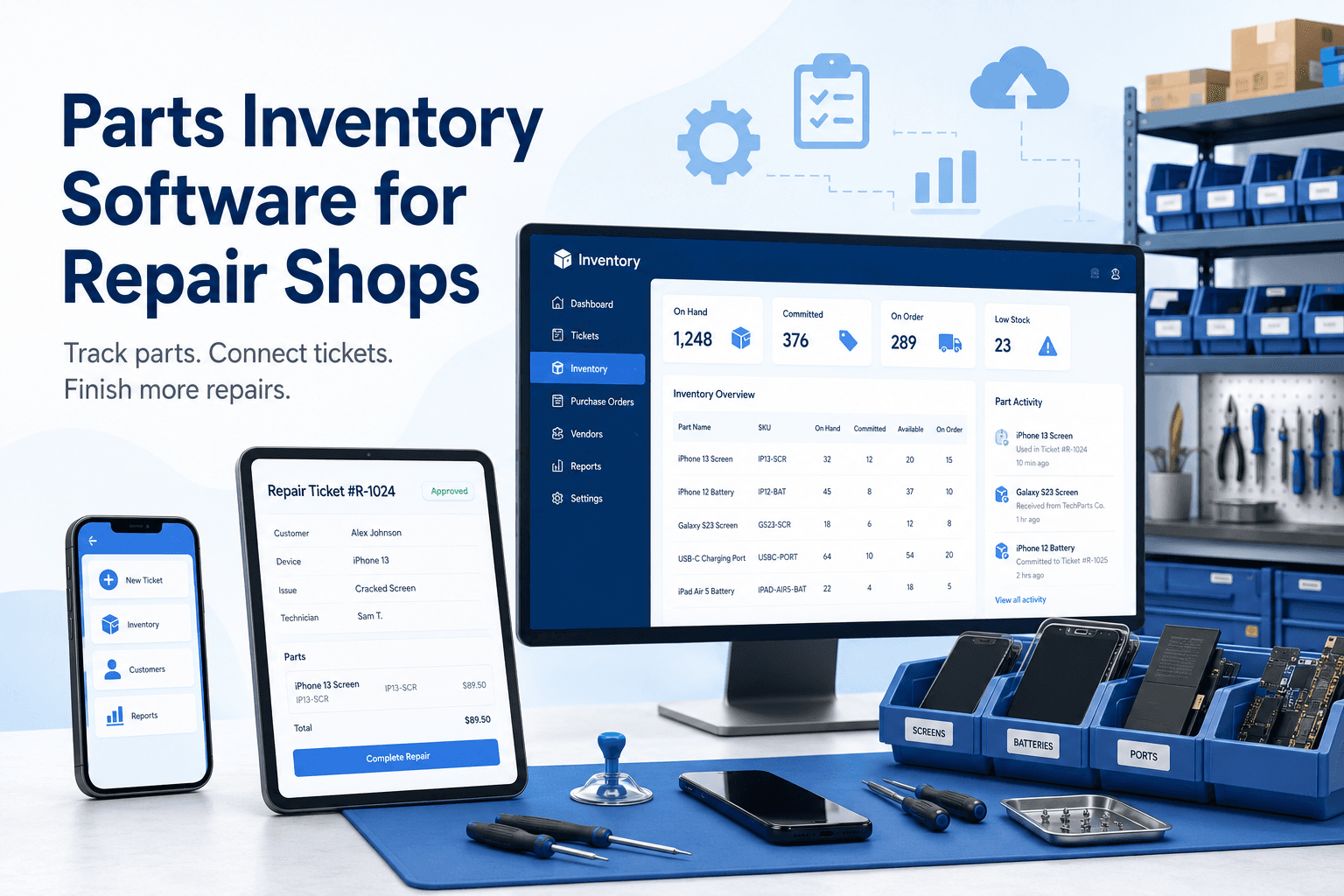
A customer approves a screen replacement, your technician opens the device, and the last compatible display is nowhere to be found. It may be sitting in a drawer, assigned to another ticket, waiting on a purchase order, or already used without being recorded. That is the point where parts inventory software stops being a back-office convenience and becomes a direct protection for your turnaround time, margin, and customer trust.
For a repair shop, inventory is not simply a count of products on a shelf. Every part has a relationship to a device, a repair ticket, a technician, a vendor, a cost, and often a warranty. Generic retail inventory tools can track an item sold across a counter. They usually fall apart when that same item needs to be reserved for an approved repair, consumed during service, returned to stock, or traced after a comeback.
What Parts Inventory Software Must Handle in a Repair Shop
The right system follows the work as it moves through your shop. At intake, staff should be able to see whether the needed part is available before quoting a realistic completion date. When an estimate is approved, the part should be reserved or clearly tied to that ticket. When the technician completes the repair, the system should record the part consumption and update on-hand quantity without asking someone to re-enter the same information in a spreadsheet.
That connection matters because a repair ticket is the center of the transaction. It contains the device issue, customer approval, labor, parts, technician work, payment status, and warranty record. If inventory lives in a separate app, staff have to bridge the gap manually. That creates familiar problems: a part is sold at the front counter but still appears available for a repair, a technician uses an item without recording it, or a manager discovers a stockout only after a customer has been promised a pickup time.
Repair-specific parts inventory software should help your team answer practical questions quickly: Do we have the correct part? Is it already committed to another job? What did we pay for it? Which vendor supplied it? Which tickets used this SKU? Did a warranty repair consume another part at our cost?
Start With the Workflow, Not the Parts List
Many shops begin an inventory cleanup by importing a vendor catalog or counting every bin. Both steps can help, but neither fixes the underlying workflow. First decide how a part enters, moves through, and exits your operation.
A typical flow begins when a part is received from a purchase order. The receiving process should increase stock and preserve the cost you paid. From there, the part may remain available for walk-in sales, be allocated to a repair ticket, or be transferred between locations. Once a technician installs it, it should be consumed against that ticket. If the repair is canceled before installation, staff need a clear way to return the part to available stock.
The details depend on your shop. A phone repair operation may stock high-volume batteries, charging ports, and displays. A motorcycle or small-engine shop may carry fewer SKUs but deal with longer lead times, fitment details, and special orders. An IT service business may need to track components against business equipment and client assets. The workflow should fit the work, not force your team to behave like a retail store.
Separate available stock from committed stock
This is one of the most useful distinctions in repair operations. A part can physically be on the shelf while no longer truly available because it is reserved for an approved ticket. If your system only shows one on-hand number, the front desk can make promises using inventory that a technician already needs.
Available quantity tells staff what can be sold or assigned now. Committed quantity tells them what has already been promised. The difference prevents double-selling and reduces the awkward conversation that follows when a customer arrives for a repair that cannot be finished.
Track cost as carefully as quantity
A count without cost data does not show whether your repairs are profitable. Vendor pricing changes, aftermarket quality varies, and expedited shipping can turn a routine repair into a low-margin job. Your system should retain the actual cost associated with the part so managers can compare it with the amount charged on the ticket.
That does not mean every shop needs complex accounting rules at the counter. It does mean owners need visibility. If a certain device model repeatedly requires expensive parts, or a supplier’s pricing has climbed, you should see the pattern before it erodes a month of revenue.
The Operational Problems Inventory Software Should Eliminate
The first problem is spreadsheet dependence. Spreadsheets can work for a small number of parts and a single person updating them. They become unreliable when multiple front-desk employees, technicians, and managers touch inventory throughout the day. The issue is not that staff are careless. It is that manual systems depend on people remembering to update the same information at exactly the right time.
The second problem is inventory without accountability. If a part count changes, management should be able to determine whether it was received, sold, installed on a ticket, returned, adjusted after a count, or written off. Without that history, shrinkage and process errors look the same. Neither can be fixed until you know which one happened.
The third problem is purchasing by instinct. Ordering based on memory often produces both overstock and stockouts. The shelves fill with slow-moving parts while fast-moving items run out at the worst possible time. Purchase orders tied to inventory give shops a clearer receiving process and a better record of what is on order. They also make it easier to follow up when a vendor shipment is short or delayed.
Finally, disconnected inventory creates customer communication problems. If your team cannot see whether a part is in stock or on order, updates become guesses. A clear inventory status lets staff set better expectations at intake and send more accurate updates when the repair is waiting on a component.
Choosing Parts Inventory Software for Repair Workflows
When evaluating software, test it against a real ticket from your shop. Do not rely only on a polished product demo. Create an intake, add a device issue, build an estimate, assign a part, approve the repair, install the part, collect payment, and look at the resulting inventory history. That sequence shows whether the system supports the work your team actually performs.
Look for ticket-level part assignment, inventory adjustments with reasons, purchase orders and receiving, vendor details, low-stock visibility, and reporting that connects parts usage to sales and repair activity. If you operate more than one location, confirm that transfers and location-specific counts are handled clearly. If you sell accessories in addition to repairs, make sure counter sales and ticket consumption draw from the same accurate stock picture.
There are trade-offs. A highly configurable inventory platform may offer more warehouse features than a small repair shop needs, but it can also add setup time and training burden. A simple POS may be easy to start with, yet require staff to maintain a separate process for tickets and parts. The strongest fit is usually software that covers the repair workflow without making your team assemble workarounds around it.
Benchry is designed around that connection, bringing repair tickets, parts usage, purchase orders, customer updates, payments, and reporting into one operating workflow. The practical benefit is less time reconciling what happened across separate systems and more confidence in what the shop can promise next.
Make the System Reliable After Go-Live
Software improves control, but only if your team uses consistent rules. Decide who receives shipments, who can adjust inventory, and when technicians must assign parts to tickets. Train front-desk staff not to promise a repair completion date until stock status is confirmed. Train technicians to record installed parts before closing a job, not at the end of a rushed week.
Set a regular cycle-count routine for your highest-volume and highest-cost items. You do not need to shut down the shop for a full inventory count every week. Counting a focused group of SKUs regularly catches errors sooner, when they are easier to investigate. Compare physical counts with system counts, document the reason for each adjustment, and look for repeat patterns.
Pay special attention to warranty work and returns. A warranty repair may be the right decision for customer retention, but it still consumes inventory and labor. Recording that usage correctly gives management an honest view of warranty cost and supplier quality. Likewise, returned or defective parts should not quietly re-enter available stock just because they were placed back on a shelf.
A good inventory process should make the repair counter calmer. When staff can see what is available, what is committed, what is on order, and what was used, they can give customers straight answers. That clarity is what turns a busy parts room from a source of daily surprises into a tool for faster, more profitable repairs.